perfect rehearsal partner
perfect rehearsal partner
perfect rehearsal partner
perfect rehearsal partner
September 2024
September 2024
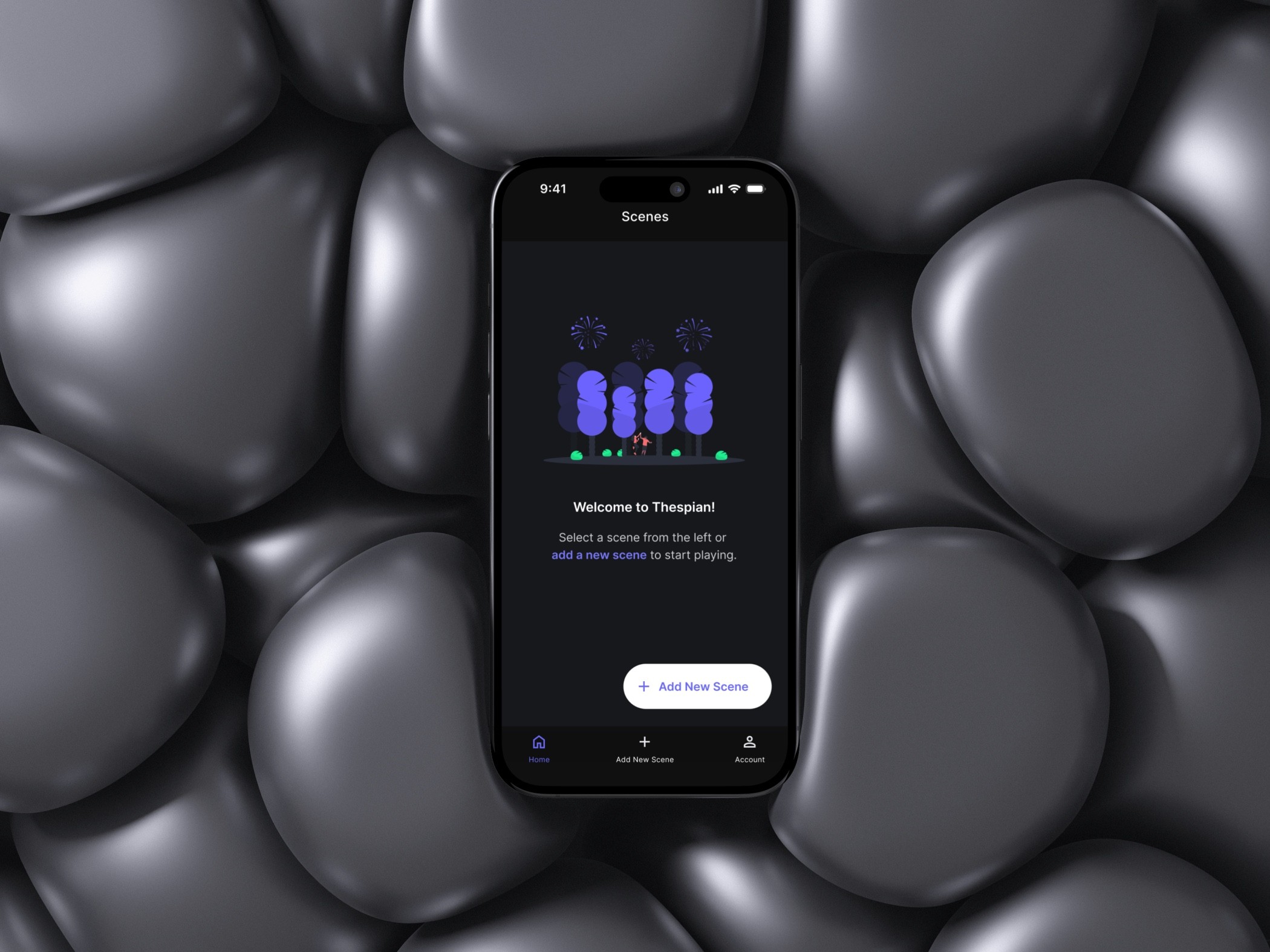
Thespian is the ultimate modern app for actors, designed to help them to elevate their acting careers. With cutting-edge technology, sleek design, and smart AI, it delivers a seamless and enjoyable experience tailored to the unique needs of performers. Whether you're honing your skills or booking your next big role, Thespian makes it effortless and inspiring every step of the way.
9 minutes to read
9 minutes to read
Overview
Actors face significant challenges when preparing for auditions and rehearsals, as traditional methods require hiring a reader, coordinating schedules with friends, or using inefficient manual processes.
We saw an opportunity to leverage AI to revolutionize the way actors rehearse, eliminating the need for external readers and making the process more independent, efficient, and seamless.
My Role
Lead Product Designer
Led end-to-end design, from discovery to delivery.
Partnered with Product and Engineering to turn vision into shippable
releases.
Defined Product Strategy and established a modular design system to drive cohesion, scalability, and accessibility.
Impact
Early testing with working actors confirmed that the core flow is intuitive and easy to learn. Participants were able to complete a rehearsal and self-tape without a human reader, describing the experience as more independent and consistent than their current workarounds. the initial accessibility baseline (captions, adjustable pacing, voice-first controls) is in place for continued iteration.
Problem Statement
Actors lack a reliable, flexible, and affordable way to rehearse scripts and record self-tape auditions when a human reader isn’t available, leading to scheduling friction, higher costs, and inconsistent performance quality.
How might we leverage AI to deliver distinct voices that follow timing cues and real-time adjustments?

Create an account

Add a new scene empty state

A new scene created empty state

Add a new line manually. Includes a Character name and AI voice selection

User account section

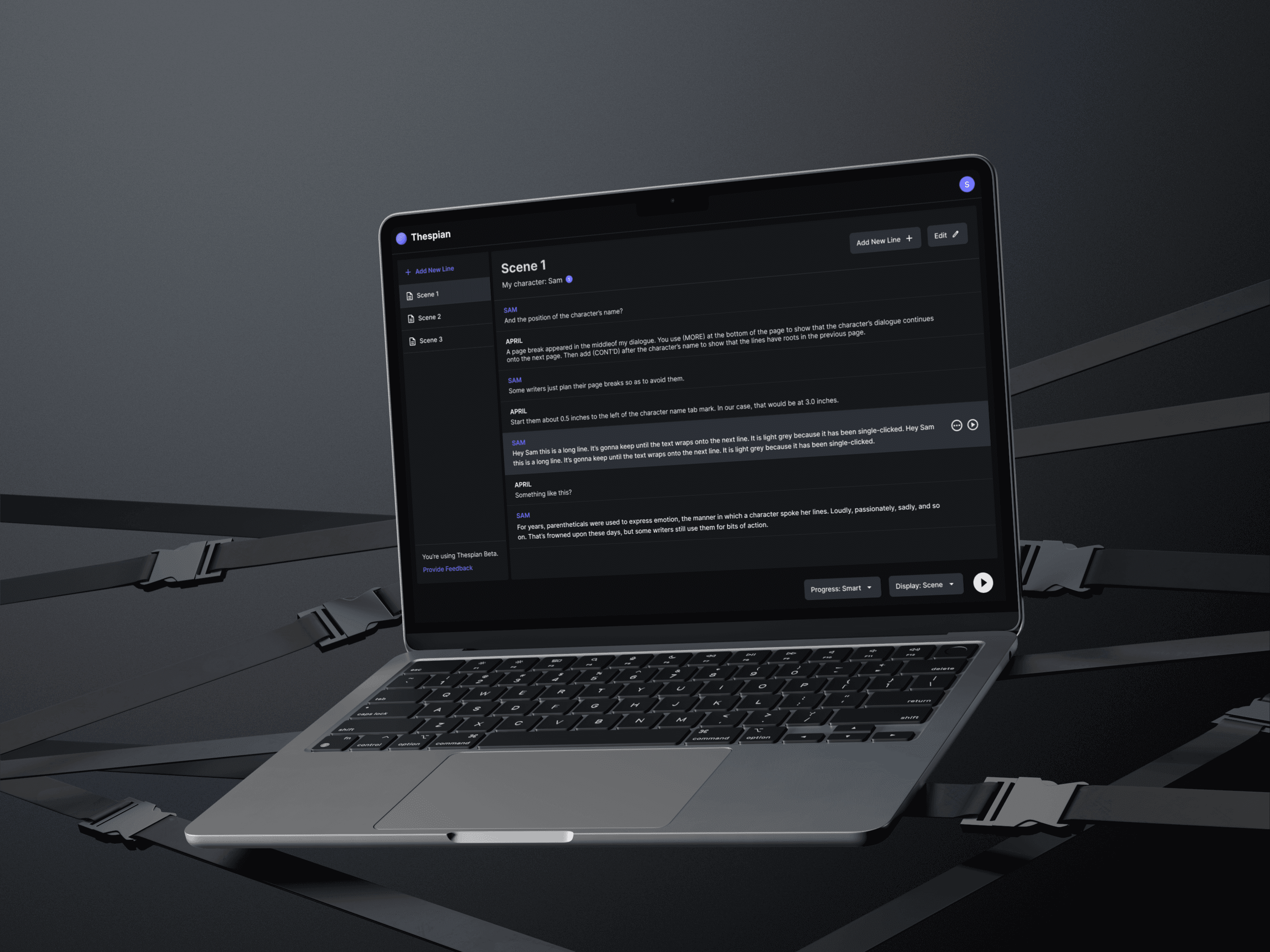
Script reader interface with self recording
Research and
Strategic Impact
I paired platform-standards research with competitive analysis to inform product strategy for Thespian. I reviewed iOS guidelines, Dark Mode best practices, in-app payments, and video-recording standards, then benchmarked direct and indirect competitors to validate these in real products and surface opportunities to differentiate and streamline the experience, then pressure-tested the flows with working actors.
Insights
Subscription models vary significantly between mobile and web, impacting user adoption.
Text reading applications utilize various readability techniques, but not all are optimized for continuous script rehearsal.
Existing video recording applications offer different approaches to UI/UX, with varying ease of use.
Users expect different onboarding flows based on platform (mobile vs. web).
Actions
Designed a payment strategy that aligns with industry best practices, ensuring a seamless subscription experience across platforms while optimizing for conversion and revenue.
Implemented dynamic teleprompter features, including real time adjustable text speed, and contrast options (for future iterations,) ensuring smooth and accessible line reading.
Researched and integrated best-in-class UX patterns from video recording tools, ensuring Thespian’s self-tape recording was intuitive, minimalistic, and actor-friendly.
Developed platform-specific onboarding experiences, reducing friction for new users while maintaining consistency in brand messaging and core interactions.
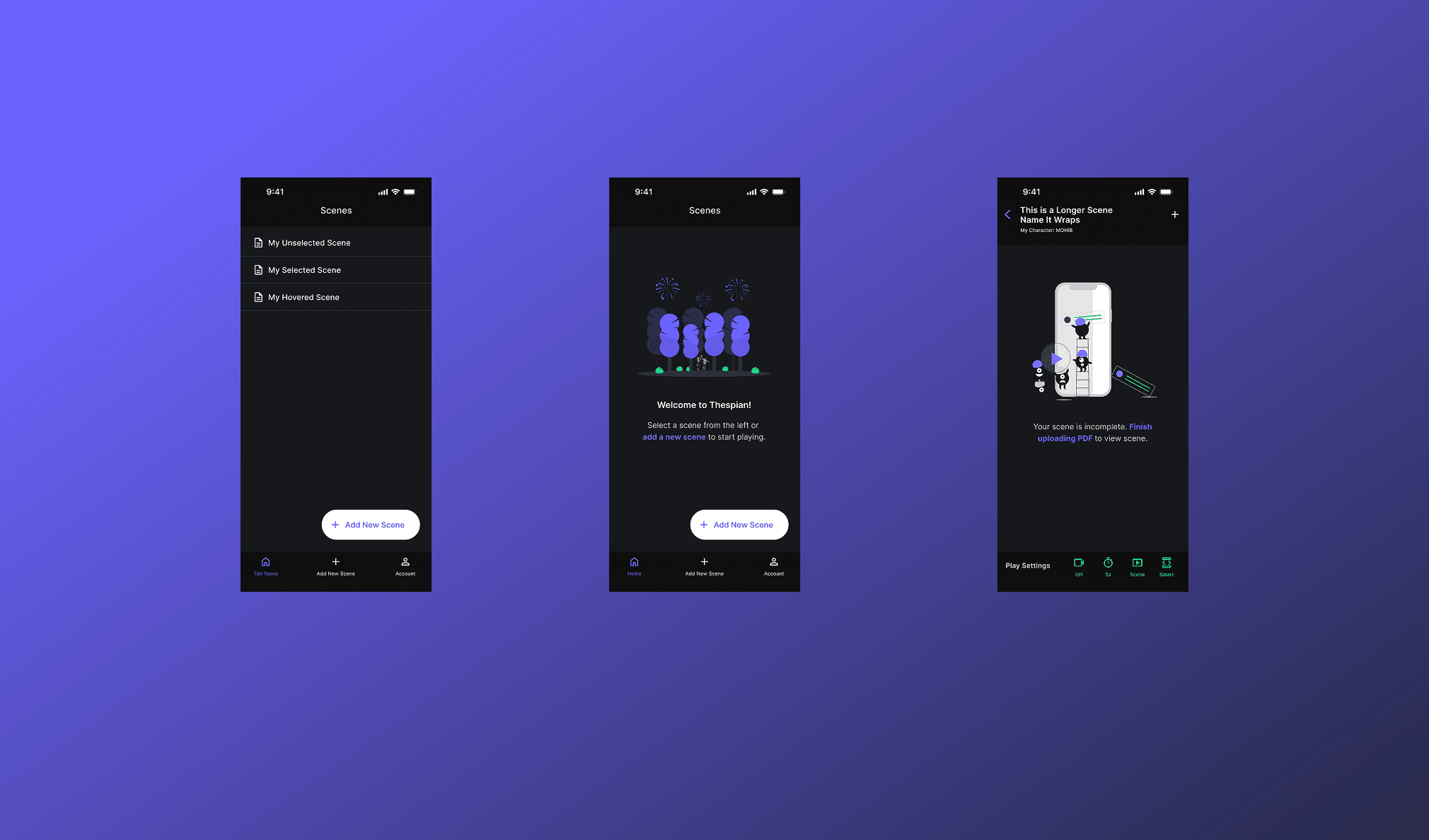
Navigation Architecture: Tab Bar vs. Toolbar
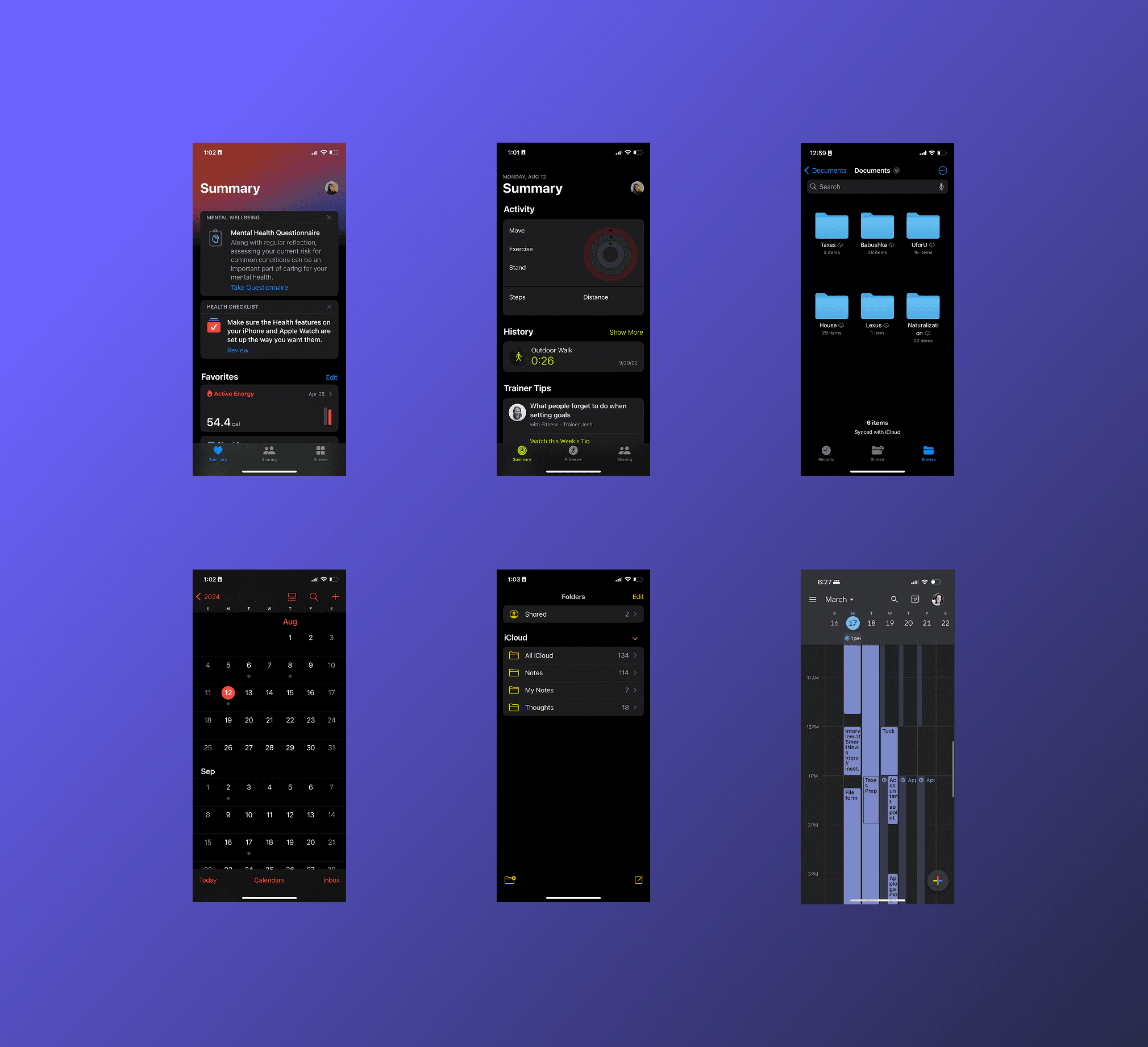
To determine the right navigation model for Thespian, I reviewed Apple’s Human Interface Guidelines and audited how Apple and leading iOS apps apply Tab Bars and Toolbars in practice.
Both (hybrid navigation)
Based on the research, we adopted a hybrid model: a Tab Bar for top-level sections (Add Scene, Scripts, Account) and Toolbars within the Script view for contextual rehearsal controls and customization. This keeps core areas one-tap away while keeping the rehearsal workspace focused and adaptive.
Both (hybrid navigation)
Based on the research, we adopted a hybrid model: a Tab Bar for top-level sections (Add Scene, Scripts, Account) and Toolbars within the Script view for contextual rehearsal controls and customization. This keeps core areas one-tap away while keeping the rehearsal workspace focused and adaptive.
Both (hybrid navigation)
Based on the research, we adopted a hybrid model: a Tab Bar for top-level sections (Add Scene, Scripts, Account) and Toolbars within the Script view for contextual rehearsal controls and customization. This keeps core areas one-tap away while keeping the rehearsal workspace focused and adaptive.
Both (hybrid navigation)
Based on the research, we adopted a hybrid model: a Tab Bar for top-level sections (Add Scene, Scripts, Account) and Toolbars within the Script view for contextual rehearsal controls and customization. This keeps core areas one-tap away while keeping the rehearsal workspace focused and adaptive.
Design
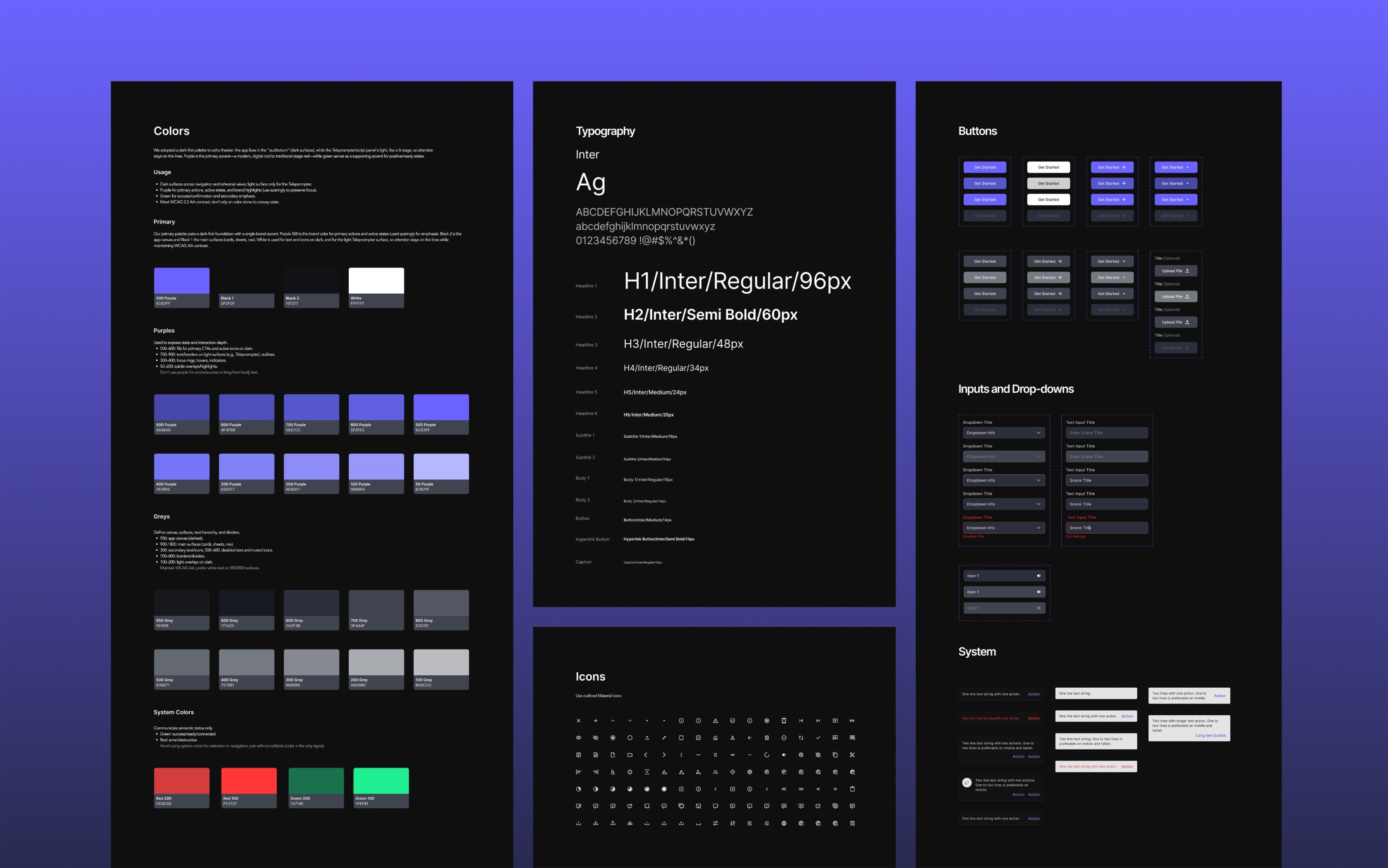
Design System
To ship consistently across iOS and Web, I established a scalable, accessible design system of tokens, components, and patterns.
Cohesive look-and-feel across platforms.
Faster cycles through reusable building blocks.
A familiar, intuitive experience regardless of device.

Add a new scene modal

Scene with all lines added mode

Teleprompter mode. Script reader with controls and AI voices
Mobile App
Actor-first, one-handed iOS experience with a dark UI and light Teleprompter. Tab Bar handles top-level nav; Toolbars expose contextual rehearsal controls. Flows account for iOS constraints (camera/mic permissions, portrait/landscape self-tapes) and HIG/VoiceOver/Dynamic Type. In-app purchases follow Apple rules, with entitlements unified to work across web and mobile.
Onboarding
Open the app and explore a quick guided tour showcasing how to rehearse and record with AI assistance.
Easily sign up by entering your email, password, and name.
Enjoy a 14-day free trial — cancel anytime or adjust your subscription settings later through your account.
Navigate intuitive empty states for each section and quickly add your first scene with a single tap.

Upload, Assign Voices, and Start Rehearsing
Add a new scene with just a few clicks — upload your script, let AI automatically detect characters and assign voices, and easily customize if needed.
Edit lines if necessary, then start rehearsing with real-time AI assistance that highlights your lines and adapts to your voice and rhythm, creating a seamless rehearsal experience.

Switch to Teleprompter View for a Real-Life Experience
Easily switch to Teleprompter View in Settings for a rehearsal mode that mirrors real-life audition setups.
After a familiar countdown, your script flows naturally — with AI highlighting and reading lines in sync with your voice and rhythm, giving you an authentic rehearsal experience.

Web Application
Responsive web app that mirrors the mobile IA and terminology, so flows feel familiar on desktop. Keyboard/mouse patterns, larger canvas, and persistent controls adapt the same tasks for the web (upload, rehearsal, playback, recording). Web checkout integrates with the same account/entitlements, and a shared cloud library keeps scripts and settings in sync across devices.

Create an account
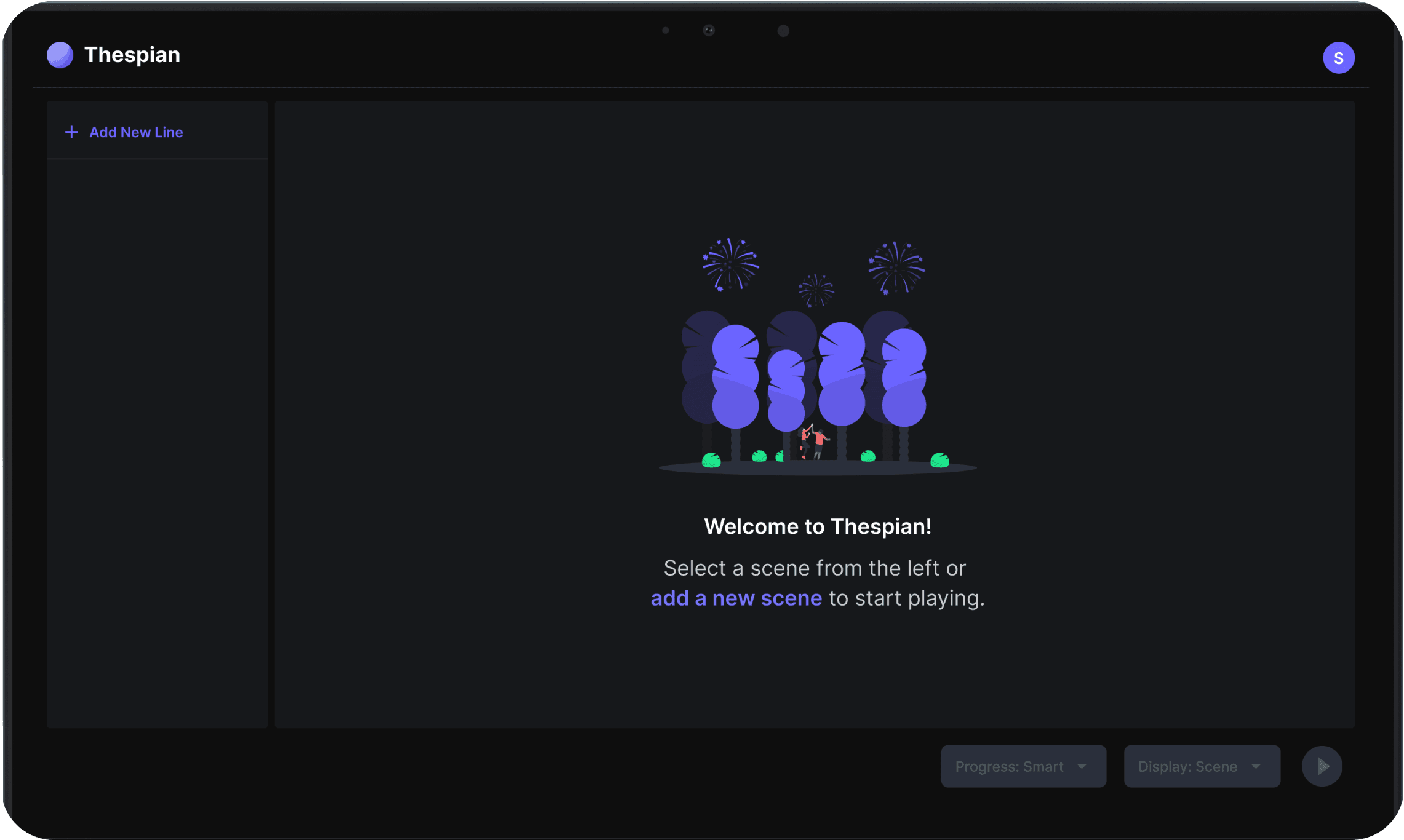
Add a new scene empty state
Add a new scene modal
Scene with all lines added mode
Teleprompter mode. Script reader with controls and AI voices
Reflection
Prototype earlier with actors. Run low-/mid-fi and Wizard-of-Oz tests sooner to validate timing, pacing, Tab-vs-Toolbar decisions, and self-tape flows before build.
Broaden edge-case coverage. Test in real rehearsal conditions—low light, noisy rooms, weak networks, long scripts, low battery/phone calls, plus accessibility passes (VoiceOver, captions, adjustable pacing).
Instrument success. At launch, benchmark time-to-first-take, cross-device usage, checkout conversion (App Store vs Web).
More Projects

Overview
Actors face significant challenges when preparing for auditions and rehearsals, as traditional methods require hiring a reader, coordinating schedules with friends, or using inefficient manual processes.
We saw an opportunity to leverage AI to revolutionize the way actors rehearse, eliminating the need for external readers and making the process more independent, efficient, and seamless.
My Role
Lead Product Designer
Led end-to-end design, from discovery to delivery.
Partnered with Product and Engineering to turn vision into shippable
releases.
Defined Product Strategy and established a modular design system to drive cohesion, scalability, and accessibility.
Impact
Early testing with working actors confirmed that the core flow is intuitive and easy to learn. Participants were able to complete a rehearsal and self-tape without a human reader, describing the experience as more independent and consistent than their current workarounds. the initial accessibility baseline (captions, adjustable pacing, voice-first controls) is in place for continued iteration.
Problem Statement
Actors lack a reliable, flexible, and affordable way to rehearse scripts and record self-tape auditions when a human reader isn’t available, leading to scheduling friction, higher costs, and inconsistent performance quality.
How might we leverage AI to deliver distinct voices that follow timing cues and real-time adjustments?
Create an account
Add a new scene empty state
A new scene created empty state
Add a new line manually. Includes a Character name and AI voice selection
User account section
Script reader interface with self recording
Research and
Strategic Impact
I paired platform-standards research with competitive analysis to inform product strategy for Thespian. I reviewed iOS guidelines, Dark Mode best practices, in-app payments, and video-recording standards, then benchmarked direct and indirect competitors to validate these in real products and surface opportunities to differentiate and streamline the experience, then pressure-tested the flows with working actors.
Insights
Subscription models vary significantly between mobile and web, impacting user adoption.
Text reading applications utilize various readability techniques, but not all are optimized for continuous script rehearsal.
Existing video recording applications offer different approaches to UI/UX, with varying ease of use.
Users expect different onboarding flows based on platform (mobile vs. web).
Actions
Designed a payment strategy that aligns with industry best practices, ensuring a seamless subscription experience across platforms while optimizing for conversion and revenue.
Implemented dynamic teleprompter features, including real time adjustable text speed, and contrast options (for future iterations,) ensuring smooth and accessible line reading.
Researched and integrated best-in-class UX patterns from video recording tools, ensuring Thespian’s self-tape recording was intuitive, minimalistic, and actor-friendly.
Developed platform-specific onboarding experiences, reducing friction for new users while maintaining consistency in brand messaging and core interactions.
Navigation Architecture: Tab Bar vs. Toolbar
To determine the right navigation model for Thespian, I reviewed Apple’s Human Interface Guidelines and audited how Apple and leading iOS apps apply Tab Bars and Toolbars in practice.
Both (hybrid navigation)
Based on the research, we adopted a hybrid model: a Tab Bar for top-level sections (Add Scene, Scripts, Account) and Toolbars within the Script view for contextual rehearsal controls and customization. This keeps core areas one-tap away while keeping the rehearsal workspace focused and adaptive.
Both (hybrid navigation)
Based on the research, we adopted a hybrid model: a Tab Bar for top-level sections (Add Scene, Scripts, Account) and Toolbars within the Script view for contextual rehearsal controls and customization. This keeps core areas one-tap away while keeping the rehearsal workspace focused and adaptive.
Both (hybrid navigation)
Based on the research, we adopted a hybrid model: a Tab Bar for top-level sections (Add Scene, Scripts, Account) and Toolbars within the Script view for contextual rehearsal controls and customization. This keeps core areas one-tap away while keeping the rehearsal workspace focused and adaptive.
Both (hybrid navigation)
Based on the research, we adopted a hybrid model: a Tab Bar for top-level sections (Add Scene, Scripts, Account) and Toolbars within the Script view for contextual rehearsal controls and customization. This keeps core areas one-tap away while keeping the rehearsal workspace focused and adaptive.
Design
Design System
To ship consistently across iOS and Web, I established a scalable, accessible design system of tokens, components, and patterns.
Cohesive look-and-feel across platforms.
Faster cycles through reusable building blocks.
A familiar, intuitive experience regardless of device.
Add a new scene modal
Scene with all lines added mode
Teleprompter mode. Script reader with controls and AI voices
Mobile App
Actor-first, one-handed iOS experience with a dark UI and light Teleprompter. Tab Bar handles top-level nav; Toolbars expose contextual rehearsal controls. Flows account for iOS constraints (camera/mic permissions, portrait/landscape self-tapes) and HIG/VoiceOver/Dynamic Type. In-app purchases follow Apple rules, with entitlements unified to work across web and mobile.
Onboarding
Open the app and explore a quick guided tour showcasing how to rehearse and record with AI assistance.
Easily sign up by entering your email, password, and name.
Enjoy a 14-day free trial — cancel anytime or adjust your subscription settings later through your account.
Navigate intuitive empty states for each section and quickly add your first scene with a single tap.
Upload, Assign Voices, and Start Rehearsing
Add a new scene with just a few clicks — upload your script, let AI automatically detect characters and assign voices, and easily customize if needed.
Edit lines if necessary, then start rehearsing with real-time AI assistance that highlights your lines and adapts to your voice and rhythm, creating a seamless rehearsal experience.
Switch to Teleprompter View for a Real-Life Experience
Easily switch to Teleprompter View in Settings for a rehearsal mode that mirrors real-life audition setups.
After a familiar countdown, your script flows naturally — with AI highlighting and reading lines in sync with your voice and rhythm, giving you an authentic rehearsal experience.
Web Application
Responsive web app that mirrors the mobile IA and terminology, so flows feel familiar on desktop. Keyboard/mouse patterns, larger canvas, and persistent controls adapt the same tasks for the web (upload, rehearsal, playback, recording). Web checkout integrates with the same account/entitlements, and a shared cloud library keeps scripts and settings in sync across devices.
Create an account
Add a new scene empty state
Add a new scene modal
Scene with all lines added mode
Teleprompter mode. Script reader with controls and AI voices
Reflection
Prototype earlier with actors. Run low-/mid-fi and Wizard-of-Oz tests sooner to validate timing, pacing, Tab-vs-Toolbar decisions, and self-tape flows before build.
Broaden edge-case coverage. Test in real rehearsal conditions—low light, noisy rooms, weak networks, long scripts, low battery/phone calls, plus accessibility passes (VoiceOver, captions, adjustable pacing).
Instrument success. At launch, benchmark time-to-first-take, cross-device usage, checkout conversion (App Store vs Web).
More Projects
Overview
Actors face significant challenges when preparing for auditions and rehearsals, as traditional methods require hiring a reader, coordinating schedules with friends, or using inefficient manual processes.
We saw an opportunity to leverage AI to revolutionize the way actors rehearse, eliminating the need for external readers and making the process more independent, efficient, and seamless.
My Role
Lead Product Designer
Led end-to-end design, from discovery to delivery.
Partnered with Product and Engineering to turn vision into shippable
releases.
Defined Product Strategy and established a modular design system to drive cohesion, scalability, and accessibility.
Impact
Early testing with working actors confirmed that the core flow is intuitive and easy to learn. Participants were able to complete a rehearsal and self-tape without a human reader, describing the experience as more independent and consistent than their current workarounds. the initial accessibility baseline (captions, adjustable pacing, voice-first controls) is in place for continued iteration.
Problem Statement
Actors lack a reliable, flexible, and affordable way to rehearse scripts and record self-tape auditions when a human reader isn’t available, leading to scheduling friction, higher costs, and inconsistent performance quality.
How might we leverage AI to deliver distinct voices that follow timing cues and real-time adjustments?
Create an account
Add a new scene empty state
A new scene created empty state
Add a new line manually. Includes a Character name and AI voice selection
User account section
Script reader interface with self recording
Research and
Strategic Impact
I paired platform-standards research with competitive analysis to inform product strategy for Thespian. I reviewed iOS guidelines, Dark Mode best practices, in-app payments, and video-recording standards, then benchmarked direct and indirect competitors to validate these in real products and surface opportunities to differentiate and streamline the experience, then pressure-tested the flows with working actors.
Insights
Subscription models vary significantly between mobile and web, impacting user adoption.
Text reading applications utilize various readability techniques, but not all are optimized for continuous script rehearsal.
Existing video recording applications offer different approaches to UI/UX, with varying ease of use.
Users expect different onboarding flows based on platform (mobile vs. web).
Actions
Designed a payment strategy that aligns with industry best practices, ensuring a seamless subscription experience across platforms while optimizing for conversion and revenue.
Implemented dynamic teleprompter features, including real time adjustable text speed, and contrast options (for future iterations,) ensuring smooth and accessible line reading.
Researched and integrated best-in-class UX patterns from video recording tools, ensuring Thespian’s self-tape recording was intuitive, minimalistic, and actor-friendly.
Developed platform-specific onboarding experiences, reducing friction for new users while maintaining consistency in brand messaging and core interactions.
Navigation Architecture: Tab Bar vs. Toolbar
To determine the right navigation model for Thespian, I reviewed Apple’s Human Interface Guidelines and audited how Apple and leading iOS apps apply Tab Bars and Toolbars in practice.
Both (hybrid navigation)
Based on the research, we adopted a hybrid model: a Tab Bar for top-level sections (Add Scene, Scripts, Account) and Toolbars within the Script view for contextual rehearsal controls and customization. This keeps core areas one-tap away while keeping the rehearsal workspace focused and adaptive.
Both (hybrid navigation)
Based on the research, we adopted a hybrid model: a Tab Bar for top-level sections (Add Scene, Scripts, Account) and Toolbars within the Script view for contextual rehearsal controls and customization. This keeps core areas one-tap away while keeping the rehearsal workspace focused and adaptive.
Both (hybrid navigation)
Based on the research, we adopted a hybrid model: a Tab Bar for top-level sections (Add Scene, Scripts, Account) and Toolbars within the Script view for contextual rehearsal controls and customization. This keeps core areas one-tap away while keeping the rehearsal workspace focused and adaptive.
Both (hybrid navigation)
Based on the research, we adopted a hybrid model: a Tab Bar for top-level sections (Add Scene, Scripts, Account) and Toolbars within the Script view for contextual rehearsal controls and customization. This keeps core areas one-tap away while keeping the rehearsal workspace focused and adaptive.
Design
Design System
To ship consistently across iOS and Web, I established a scalable, accessible design system of tokens, components, and patterns.
Cohesive look-and-feel across platforms.
Faster cycles through reusable building blocks.
A familiar, intuitive experience regardless of device.
Add a new scene modal
Scene with all lines added mode
Teleprompter mode. Script reader with controls and AI voices
Mobile App
Actor-first, one-handed iOS experience with a dark UI and light Teleprompter. Tab Bar handles top-level nav; Toolbars expose contextual rehearsal controls. Flows account for iOS constraints (camera/mic permissions, portrait/landscape self-tapes) and HIG/VoiceOver/Dynamic Type. In-app purchases follow Apple rules, with entitlements unified to work across web and mobile.
Onboarding
Open the app and explore a quick guided tour showcasing how to rehearse and record with AI assistance.
Easily sign up by entering your email, password, and name.
Enjoy a 14-day free trial — cancel anytime or adjust your subscription settings later through your account.
Navigate intuitive empty states for each section and quickly add your first scene with a single tap.
Upload, Assign Voices, and Start Rehearsing
Add a new scene with just a few clicks — upload your script, let AI automatically detect characters and assign voices, and easily customize if needed.
Edit lines if necessary, then start rehearsing with real-time AI assistance that highlights your lines and adapts to your voice and rhythm, creating a seamless rehearsal experience.
Switch to Teleprompter View for a Real-Life Experience
Easily switch to Teleprompter View in Settings for a rehearsal mode that mirrors real-life audition setups.
After a familiar countdown, your script flows naturally — with AI highlighting and reading lines in sync with your voice and rhythm, giving you an authentic rehearsal experience.
Web Application
Responsive web app that mirrors the mobile IA and terminology, so flows feel familiar on desktop. Keyboard/mouse patterns, larger canvas, and persistent controls adapt the same tasks for the web (upload, rehearsal, playback, recording). Web checkout integrates with the same account/entitlements, and a shared cloud library keeps scripts and settings in sync across devices.
Create an account
Add a new scene empty state
Add a new scene modal
Scene with all lines added mode
Teleprompter mode. Script reader with controls and AI voices
Reflection
Prototype earlier with actors. Run low-/mid-fi and Wizard-of-Oz tests sooner to validate timing, pacing, Tab-vs-Toolbar decisions, and self-tape flows before build.
Broaden edge-case coverage. Test in real rehearsal conditions, low light, noisy rooms, weak networks, long scripts, low battery/phone calls, plus accessibility passes (VoiceOver, captions, adjustable pacing).
Instrument success. At launch, benchmark time-to-first-take, cross-device usage, checkout conversion (App Store vs Web).